Top 7 Best Free Video Splitters to Split Videos (2021)
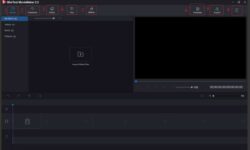
Splitting a large video file into smaller segments helps us publish the videos to content-sharing sites, upload to a cloud storage service, or send them by email. If you are looking for easy-to-use video splitter software that can quickly cut videos into multiple segments while maintaining good video quality, you have come to the right place. This post will list the 7 best free video trimming software and briefly introduce their features, and you could choose one program that meets your needs to split large videos. 01. MiniTool MovieMaker The free Windows video editor – MiniTool MovieMaker can work as the video splitter software. You could use the program for free to trim/split any video into multiple parts and to combine many video clips with only a few clicks. Please follow the tutorial to split videos with MiniTool MovieMaker. Step1. Install this MiniTool video splitter program on Windows 10/8/7. Free download MiniTool MovieMaker on the official website ( www.minitool.com ) and install it on your PC. Step 2. Import some of your video files. The image below shows what the software’s main UI looks like. The software main interface is composed of 3 parts, including the media library, preview window,…