
Controlling external devices using COM port communications programmed using VB language

There are a lot of Radio amateurs that want to control external devices using computer standard ports. One of them is the COM port. Everybody wants things to be easy as people doing electronics are more hardware people, not software. COM port is more often used than LPT because COM port is more resistive to bigger loads, and there are fewer chances of failing. So if you know Visual Basic a little bit, then this shouldn’t be tough to use the MSComm Control component, located in Project->Components. You should check box MSComm Control. Later you have to add this control to the form and write some code for it.
Continue reading

Understanding and conversion different firmware file formats

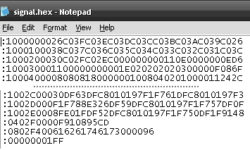
Without getting too deep in discussions about why there are several firmware formats and extensions used. But the fact is that you can face firmware files with extensions like BIN, HEX, or E2P. Let’s see how these files look like and how to convert between them. First of all, it is important to mention that all firmware files can be one of two types: Text files contain ASCII symbols (codes from 32h to FFh); Binary files contain all ASCII symbols including nonprintable symbols (00h to FFh). First advice – never rely on file extension as it can be any. All are inside the file. So how to define what’s inside the file and what format? One easy way is to open a file with a notepad and see how the contents 犀利士 look inside. Continue reading

Continue reading